Video Email Marketing: How to Leverage GIFs and AI for B2B Outreach
Ever sent a sales email and wondered if anyone even opened it?
You spend time researching prospects, writing personalized messages, and crafting the perfect pitch. But sometimes, all you get is silence.
And when you think about it, it's not that surprising.
B2B buyers receive countless emails filled with similar introductions, product descriptions, and requests for a quick 15-minute call. After a while, everything starts to blend together.
So, how do you make your email worth paying attention to?
What if you could show your idea instead of just explaining it?
That's where videos and GIFs come in. Instead of writing three paragraphs about a new feature, you could show how it works. Or rather than sending another generic pitch, you could create a short, personalized animation inspired by the prospect's actual product or brand.
We've previously explored how businesses manage their growing demand for content in our guide to outsourcing creative for B2B companies . And sales outreach is another area where having the right creative assets can make a difference.
With AI, creating those assets is becoming easier. Researching prospects, developing creative ideas, and personalizing content no longer have to take hours for every email.
But here's where it gets interesting.
Just because you can personalize something doesn't mean people will appreciate it.
Just because you can personalize something doesn't mean people will appreciate it.
We found this out through our own B2B sales video survey.
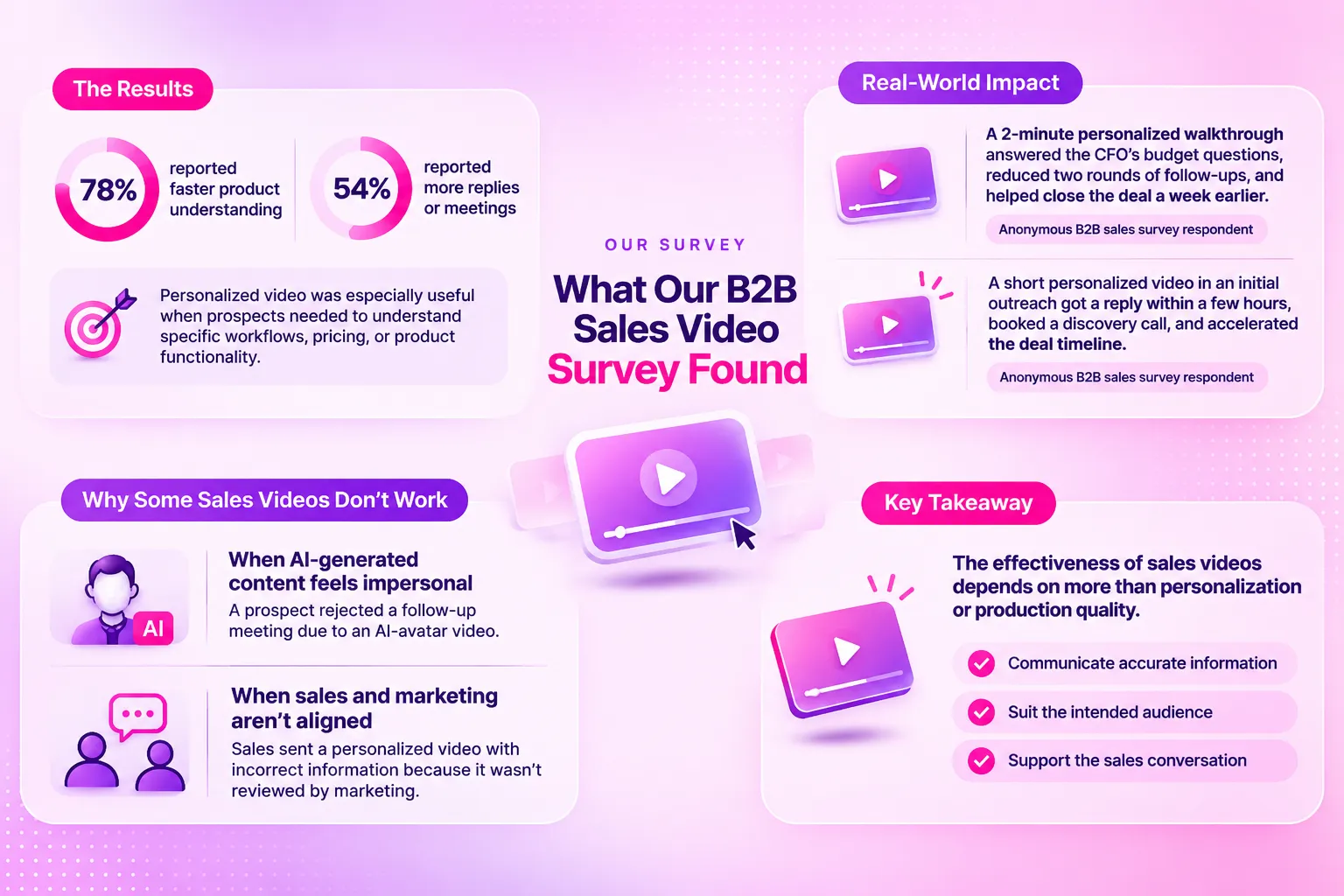
One respondent reported that a prospect rejected a follow-up meeting because they didn't like the AI-generated avatar used in a sales video.
That's a pretty clear reminder that getting someone's attention and making a good impression are two different things.
So, when should you use videos and GIFs in B2B emails? And how do you make sure they're actually adding value rather than becoming another distraction?
About the data: We surveyed B2B sales and account-management professionals through Prolific from November 4–8, 2026, receiving 149 submissions. Of those, 99 qualified for the main survey, which focused on sales leaders and decision-makers whose teams had already used video with prospects or customers. These findings reflect the experiences of video-using B2B sales teams, not all sales teams. The full report, covering all 29 survey questions, is scheduled for release at the end of November 2026.
What is video email marketing?
Video email marketing is the use of animated GIFs, video previews, or links to hosted videos in emails to communicate messages more visually and encourage engagement.
And it's not just for marketing campaigns. Video is also used in B2B sales prospecting, where sales teams use personalized animations, product demos, and short video messages to introduce their solutions, reach potential customers, and follow up with prospects.
There are a few ways businesses can utilize video in their emails:
- Animated GIFs: Short, looping visuals that can demonstrate product features, UI interactions, or personalized creative concepts directly in supported email clients. They're particularly useful when you want to communicate an idea in just a few seconds.
- Video thumbnails: Static or animated previews that link to longer videos. These work well for product demonstrations, customer testimonials, and personalized walkthroughs.
- Embedded videos: Videos that play directly inside certain email clients. However, email client compatibility varies, making this approach less reliable for large-scale campaigns.
For B2B SaaS companies, short animations can be particularly useful. Instead of explaining a feature through several paragraphs, a GIF can show how it works in seconds.
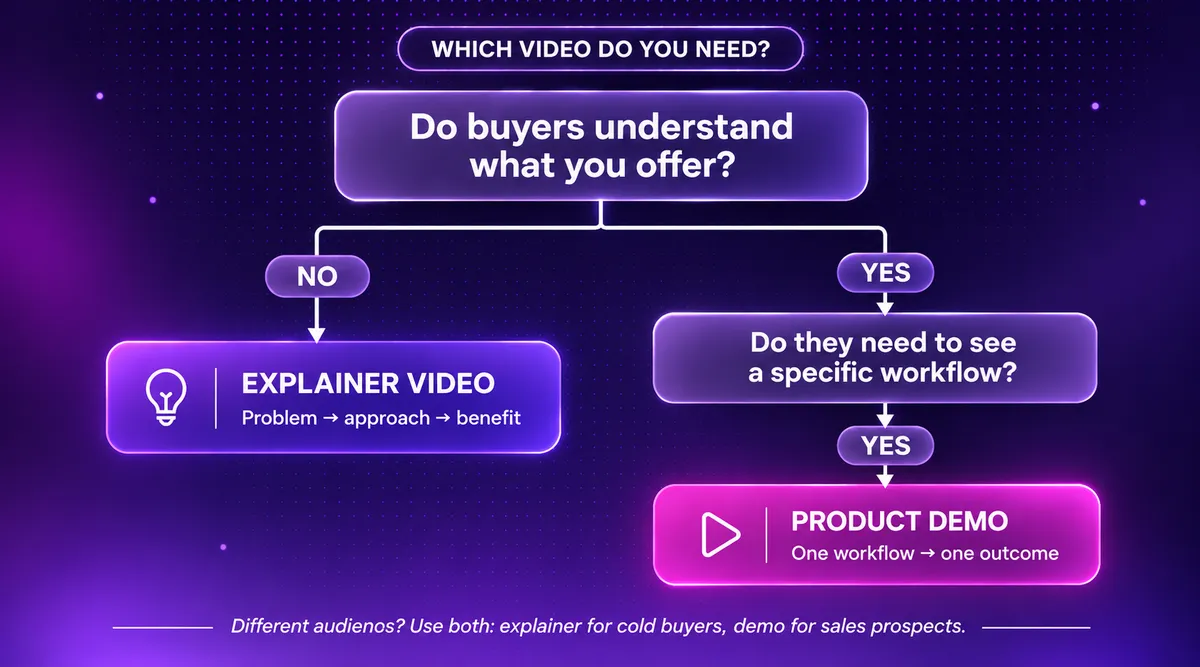
But the type of video you use should depend on what you're trying to achieve. As we explain in our guide to the SaaS video marketing funnel , different video formats serve different purposes throughout the buyer journey, from introducing a product to helping prospects evaluate a solution.
In sales prospecting, the approach can be a little different. A personalized GIF might reference a prospect's product, brand, or recent announcement, giving the outreach something more relevant than another generic sales pitch.
But not every message needs animation. The goal isn't to add video to every email. It's to use the right visual format when it genuinely helps communicate something better.
A short GIF might be enough to introduce an idea, while detailed product demonstrations or complex buying decisions usually benefit from a longer video and a proper sales conversation.
Does video email marketing actually work?
What our B2B sales video survey found
Does adding video to a sales email actually make a difference?
According to Motion The Agency's November 2026 B2B Sales Video Survey, 78% of 99 qualified sales leaders reported that video helped prospects understand products faster, while 54% reported more replies or meetings.
These findings come from Question 15, which asked respondents what outcomes they had experienced when using video in their sales process. Respondents could select multiple answers, giving us a clearer picture of how video supports sales conversations beyond simply capturing attention.
But here's what's interesting. The value of video wasn't necessarily about making emails more engaging. It was about helping prospects understand information that would otherwise take several emails or meetings to explain.
One respondent shared how a personalized video helped move a deal forward:
“During the proposal stage of a recent deal with a mid-market prospect, we sent a 2-minute personalized video walkthrough of the custom pricing schedule and implementation roadmap. The primary contact shared the video directly with their CFO and executive team, who hadn't attended the initial meetings. This answered the CFO's budget questions upfront, eliminated two rounds of email follow-ups, and helped us close the deal a week ahead of schedule.” Anonymous B2B sales survey respondent
And it wasn't just useful during the later stages of the sales process.
Another respondent described how a personalized Loom video helped turn an initial outreach email into a discovery call:
“During the initial outreach stage, we sent a short, personalized Loom video walking a prospect through how our platform solves their specific workflow bottleneck. The prospect replied within a few hours saying it was the clearest explanation they had seen, which immediately booked us a discovery call and accelerated the deal timelines.” Anonymous B2B sales survey respondent
Notice what both examples have in common?
Neither video was simply introducing a product or asking someone to book a meeting. They addressed something the prospect actually needed to understand.
That's where video can add real value to B2B emails. It's not necessarily about making your message look different. It's about making the information more relevant, easier to understand, and easier to share with the people involved in a buying decision.
Why some sales videos don't work as intended
Just because you've included a video in your sales email doesn't mean someone will actually watch it.
There are plenty of reasons why a sales video might fall short. Maybe it's too long, the opening doesn't grab attention, or the content simply isn't relevant to the prospect.
And sometimes, asking someone to click through and watch a three-minute video is already too much.
That's where GIF previews can make a difference. Instead of relying on a static thumbnail, a short animated preview gives prospects a sneak peek of the video's content, whether that's a product feature, a workflow, or a key message.
But the preview is only part of it.
Video length and quality matter, too. A quick introduction shouldn't take several minutes, while a detailed product demo might need more time. And quality isn't necessarily about expensive production. Clear messaging, appropriate pacing, and relevant visuals are often more important.
Our B2B sales video survey also uncovered two examples where things went wrong for entirely different reasons: an AI-generated avatar that put off a prospect and an unapproved video containing incorrect product information.
Both show that getting sales video right takes more than just adding movement to your email.
When AI-generated content feels impersonal
AI makes it easier to create personalized sales content at scale. But just because a video includes someone's name or uses an AI avatar doesn't mean it feels personal.
One survey respondent shared an experience where an AI-generated video actually discouraged a prospect from continuing the conversation:
“Prospect rejected a follow up meeting becuase of the use of AI avatar in a syntheia video. This is usually not something people comment on, but is becoming noticable in the feedback from prospects.” Anonymous B2B sales survey respondent
The prospect declined a follow-up meeting after receiving the video. While we don't know whether the entire deal was lost, it's an interesting example of how AI-generated content can miss the mark.
The lesson? Personalization and authenticity aren't necessarily the same thing. AI can speed up production, but the format still needs to feel relevant and appropriate for the person receiving it.
When Sales and Marketing Aren't Aligned
Marketing and sales might share the same business goals, but they don't always communicate with the same audience in the same way.
Marketing teams typically create content for broader audience segments, following established brand guidelines and ideal customer profiles (ICPs). Sales outreach, on the other hand, is more personal. Salespeople often know who they're contacting, which company they work for, and what challenges they're facing.
But that flexibility can create problems when messaging isn't aligned.
One respondent from our B2B sales video survey shared an example:
“The sales team didn't run the video by marketing. They recorded their own and sent incorrect information to a potential client. Usually, personalized videos are well received.” Anonymous B2B sales survey respondent
The issue wasn't personalization itself. It was the lack of coordination that allowed incorrect information to reach a prospect.
So, how can sales teams personalize videos while keeping their messaging accurate?
A few practical sales enablement measures can help:
- Approved video templates: Provide reusable introductions, product visuals, and branded assets that salespeople can customize.
- Centralized content library: Keep product demos, feature explanations, and messaging accurate and accessible.
- Personalization guidelines: Define which elements salespeople can customize and which require approval.
- Clear review processes: Require marketing or product approval for new claims, pricing changes, or technical information.
With these measures in place, sales teams can personalize their outreach without creating everything from scratch or risking outdated information.
We've explored this further in our guide to B2B sales collateral , including how reusable content and creative assets can support sales conversations throughout the buyer journey.
Ultimately, a good sales video needs more than an engaging format or a personalized message. It needs to be accurate, relevant to the recipient, and genuinely useful to the sales conversation.
How can you make B2B sales emails stand out from generic outreach?
Most B2B sales emails look the same. A generic introduction, a product pitch, and another meeting request.
The key to standing out? Give prospects something relevant and valuable, not just another sales pitch.
The takeaway: A GIF or video won't automatically make your outreach better. What matters is the idea behind it and how relevant it is to the recipient.
When should you use GIFs and videos in B2B emails?
Not every video format works for every type of B2B email.
A short GIF might be perfect for showing a product feature in a few seconds. But when a prospect has specific questions about pricing, integrations, or implementation, a personalized video walkthrough is probably more useful.
And our survey findings back this up.
One respondent reported that video made little to no difference to response rates during initial cold outreach. However, animated product demos and recorded walkthroughs became much more valuable later in the sales process, when prospects were actively evaluating the product.
The takeaway? It's not about adding video to every email. It's about using the right format at the right moment.
What works for a cold email might not work for a sales follow-up, and vice versa.
How motion uses AI to personalize GIF outreach without losing the human touch
Creating a personalized GIF for every prospect sounds great in theory. But researching hundreds of companies, coming up with relevant ideas, and producing individual animations? That's a lot of work.
At Motion The Agency, we use AI to make that process more manageable. Not to replace our designers, but to help them spend less time on repetitive tasks and more time creating something worth sending.
AI makes research and personalization easier
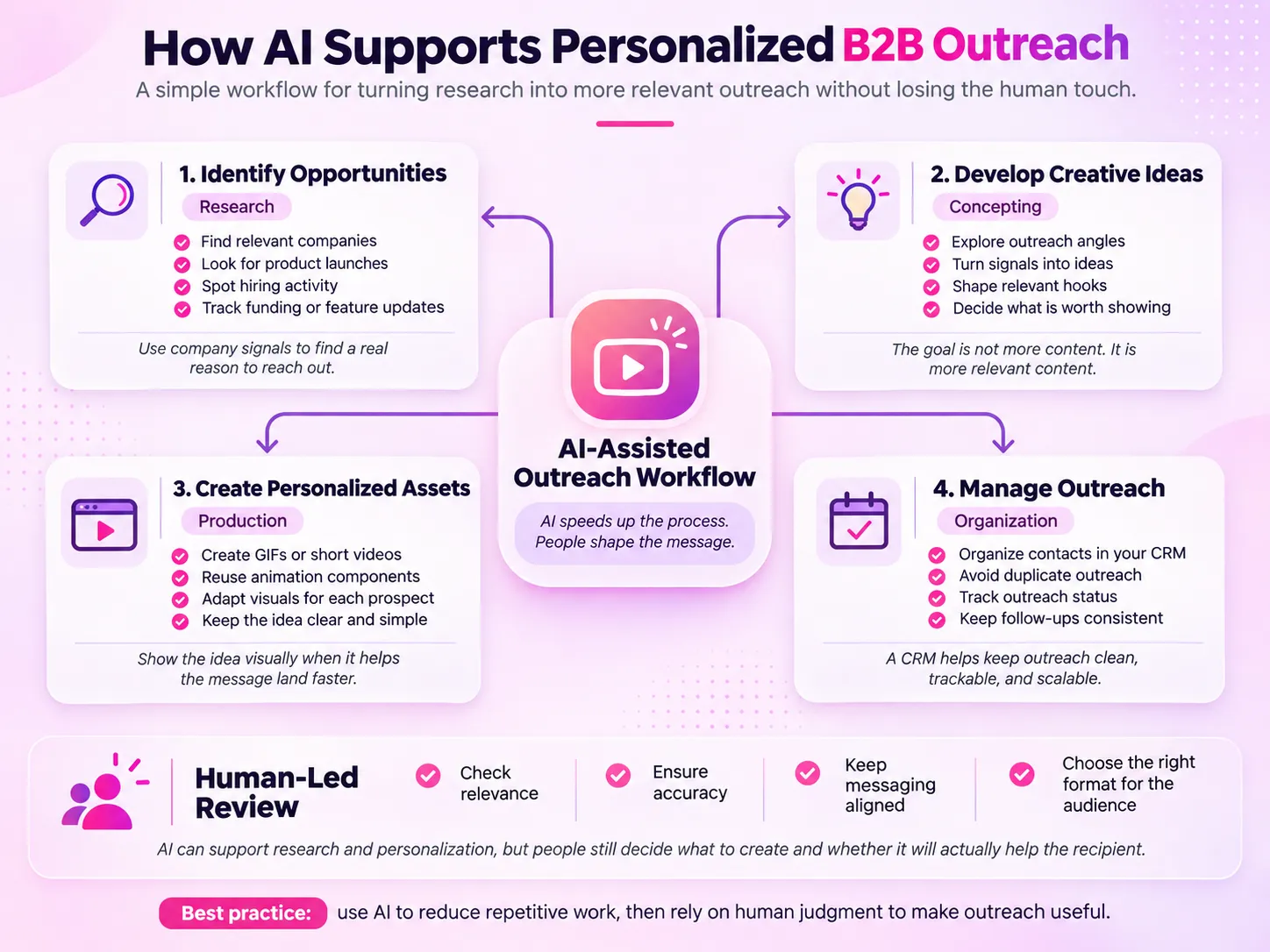
We combine tools like Claude, Apollo, Apify, LinkedIn, and HubSpot to research prospects and identify opportunities for personalized outreach.
For example, a company launching a new SaaS feature might benefit from a short product animation. Rather than sending another generic introduction, we can develop a GIF concept around that specific launch.
Here's how we approach it:
- Research: Use AI-assisted tools to identify relevant companies, recent announcements, and potential opportunities.
- Personalize: Develop creative concepts based on each prospect's product, brand, or business needs.
- Create: Use reusable animation components to produce variations without starting from scratch.
- Organize: Keep prospect information and outreach activity organized in HubSpot to avoid unnecessary duplication.
This helps us make personalized outreach more scalable while giving our creative team more time to focus on the actual idea.
Why human judgment still matters
But there's something AI can't guarantee: whether the recipient will actually appreciate what you've created.
Remember the survey respondent whose prospect rejected a follow-up meeting because of an AI-generated avatar? Or the salesperson who accidentally shared incorrect product information in an unapproved video?
Both examples highlight why human involvement still matters.
At Motion, our designers turn research and initial concepts into finished animations, making decisions about visual storytelling, pacing, and brand consistency.
And sometimes, that means deciding not to use animation at all.
A simple screen recording might explain a product feature better than a polished GIF. A short written email might be more appropriate than a personalized video.
The point isn't to automate every part of sales outreach or add visuals wherever possible.
It's to use AI to handle repetitive work while keeping creativity, relevance, and quality control in human hands
How ClickUp uses short animations in email marketing: A client example
Most B2B outreach relies on text-heavy emails, generic introductions, and familiar sales pitches. So, how do you make your message stand out?
One approach is to use personalized GIFs to turn a relevant idea into something prospects can actually see. Rather than sending the same animation to everyone, businesses can create short visuals inspired by a prospect's product, brand, or recent announcement.
But GIFs aren't just useful for cold outreach. They can also help businesses communicate with existing customers.
Take our collaboration with ClickUp, the productivity and work management platform, for example.
At Motion The Agency, we created animated GIFs for ClickUp's email campaigns, alongside product tutorials, explainer videos, and social media assets.
These animations helped make product features and updates easier to communicate visually, while keeping the content consistent with ClickUp's established brand identity.
And it wasn't just a one-off project. Our collaboration grew into a 12-month creative subscription, with more than 30 projects completed in the first six months.
This meant ClickUp could continue producing different types of creative content without approaching every animation as an entirely separate project.
The takeaway? GIFs work best when they have a clear purpose. A personalized animation might help introduce a creative idea during cold outreach, while a short product GIF can help existing customers understand a new feature.
It's not about adding movement to every email. It's about using animation when it makes the message more relevant, easier to understand, or worth paying attention to.
You can explore more in our ClickUp customer story .
Conclusion: Make every video count in your B2B emails
So, should you start adding GIFs and videos to every B2B email?
Not quite.
Our survey findings suggest that video can help prospects understand products faster, generate more conversations, and make complex information easier to share. But they also show that not every video works for every prospect or stage of the sales process.
A personalized GIF might help your cold outreach stand out, while a product walkthrough could be more useful when buyers are evaluating your solution. It's about knowing what your audience needs and choosing the right format to deliver it.
AI can make researching prospects and creating personalized content easier, but human creativity and judgment are still essential. After all, a flashy animation won't mean much if the message behind it isn't relevant.
At Motion The Agency, we believe the best approach is to combine thoughtful creative ideas with reusable assets that make ongoing content production more efficient.
Because ultimately, the goal isn't to add more videos to people's inboxes. It's to give them something worth watching.
Want to see how animation could work for your next email campaign? Get a free video sample from Motion The Agency and explore a creative concept tailored to your brand before committing to a full project.

Widi Setyowati
Widi is a content marketing specialist with experience in video marketing, email marketing, and content creation. At Motion The Agency, she specializes in crafting engaging video campaigns, impactful email outreach, and insightful written content.

In just a few questions, get a tailored estimate for your next video project.




Contact Us
Ready to elevate your brand? Contact us for your
Free Custom Video Sample