Product Demo Video Production: 15 Ways to Make One That Converts (2026)

table of content
TL;DR
- There are 15 product demo video production methods covered here, from basic screen recording to full professional animation, each scored on speed, cost, engagement, professionalism, and ease of updates.
- AI-assisted production is faster and cheaper, but not always the right fit. For high-stakes, customer-facing demos, professional production wins on quality every time.
- Pre-production determines the outcome. A clear script, defined audience, and locked brief will save more time and budget than any tool or method.
- If you'd rather hand it off entirely, request a free sample and see what Motion's production quality looks like before committing.
Product demo video production is one of the most valuable investments a growing brand can make, but the range of approaches available is wider than most people realise. You can build a credible, conversion-driving demo for under a few hundred dollars using basic screen recording tools, or commission a full professional production with animation, voiceover, and motion graphics at a much higher investment. Both can work. The question is which method fits your goals, timeline, and budget.
This guide covers 15 product demo video production methods in detail, from basic screen and face recording through to full professional production, with each one scored across five criteria: speed, cost, engagement, professionalism, and ease of updates. Here's what you'll learn:
- How to choose the right production method for your business size and goals
- Which tools and software to use at each level
- How Motion The Agency approaches product demo video production for B2B and SaaS brands
If you're looking for real-world examples of great product demos first, our product demo video examples guide covers 15 of the best. Otherwise, let's get into the production framework.
What is a product demo video?
A product demo video is a type of video content that showcases a company's product or service in action. The primary purpose of a product demo video is to educate and inform potential customers about the features, functionality, and benefits of a product, with the goal of driving interest, engagement, and ultimately, conversions.
At Motion, product demo video production typically spans three stages: pre-production (script, storyboard, style selection), production (animation, voiceover, visual design), and post-production (editing, sound design, delivery). Understanding those stages helps you evaluate any of the 15 methods below more accurately.
Before you start: preparing for a product demo video production

Successful product demo video production starts well before any recording begins. The five steps below apply whether you're doing it in-house or working with an agency:
1. Brainstorming and strategy — define what you want viewers to feel and do after watching. Every production decision flows from this.
2. Equipment and tools — decide your production tier (screen recording, AI avatar, or full animation) before you brief anyone or start buying tools.
3. Clear objectives — set measurable success criteria. Is this video for a product page, sales outreach, a launch campaign, or onboarding? Each has different requirements.
4. Audience understanding — a B2B software buyer and a consumer app user need completely different demos. Research what your audience already knows and what still confuses them.
5. Budget and timeline — lock these before production starts, not during. The 15 methods below are scored partly on cost so you can match method to budget from the outset.
Core components of product demo videos
Every product demo video, regardless of production method, shares the same building blocks. Understanding these components upfront helps you brief a production team, evaluate quality, and avoid the most common production mistakes.

2-channel vs 3-channel product demo video production: which format do you need?
Selecting the appropriate format for your demo video is crucial. Each format offers distinct features and advantages. Let's explore the differences between the two primary formats.
What is a 2-channel demo?
A 2-channel demo consists of two key elements that work together:
- Voice Narration: Clear and concise audio that guides viewers through the video's content.
- Product Visuals: Engaging images that showcase the product in action, highlighting its features and functions.
Best For Various Applications:
- Technical tutorials where viewers benefit from straightforward, verbal step-by-step instructions.
- Quick product updates aimed at delivering information efficiently without overwhelming the audience.
- Internal training materials designed to boost employee knowledge and skills, facilitating a smooth learning experience.
- Documentation that visually illustrates key product features, ensuring that important information is clearly communicated.
What is a 3-channel demo?
A 3-channel demo enhances the viewing experience by integrating three essential components:
- Presenter (Human or AI Avatar): A visual narrator, either a real person or a digital avatar, that engages the audience and creates a connection.
- Voice Narration: Descriptive audio that supports the visuals, adding context and making the content easier to understand.
- Product Visuals: Compelling images that emphasize the product's key features and captivate viewers, making the presentation more visually appealing.
Best Suited For Various Scenarios:
- Building trust and rapport with the audience by providing a personal connection through the narrator.
- Complex product explanations where detailed context is necessary to help the audience grasp the product's nuances and benefits.
- Sales-oriented demonstrations designed to persuade viewers and convert them into customers by effectively conveying the product's value through engaging storytelling.
- Important presentations where maintaining viewer engagement and clarity is crucial, making the additional channel an integral part of the demo.
What the difference looks like in practice: low quality vs professional production
To demonstrate the importance of production quality, here’s a comparison of two approaches to product demo videos:
In this example, a client used a basic template to present their product demo with a simple screen recording and AI voiceover. While this approach was quick and cost-effective, it lacked the visual appeal and engagement necessary to hold the audience’s attention. The result felt functional but unpolished, leaving room for significant improvement.
Below is a video made by Motion The Agency of a product demo that has been made to look more professional.
Motion The Agency transformed this demo by starting with detailed planning and incorporating professional voice-over talent. We elevated the visual style with engaging motion graphics, visual effects, and a cohesive color scheme. The final product included sound design and music to enhance the viewing experience, creating a professional and captivating video that effectively communicated the product's value.
Tools and software for product demo video production
Choosing the right software for your product demo video can make the production process efficient and professional. Here's a breakdown of useful tools and their alternatives:
Recording software
Loom & Vidyard

These tools are excellent for screen recording and webcam integration, offering editing features and analytics for tracking video performance.
Alternatives
- ScreenFlow: A Mac-based screen recording tool with advanced editing features.
- OBS Studio: A free, open-source tool for screen recording and live streaming.
Voice-over software
ElevenLabs

A leader in AI-driven voiceovers, providing natural-sounding and flexible narration tools.
Alternatives:
- Artlist known for its royalty-free music library, Artlist now includes AI-powered voiceover tools, offering customizable voice options for professional-quality narration.
- Descript: Combines voiceover tools with transcription and audio editing.
Planning
Figma

- A collaborative design tool perfect for planning, wireframing, and storyboarding.
Alternatives:
- Canva: Simple and user-friendly for creating visual plans and storyboards.
AI avatars
Synthesia & Heygen

These platforms use AI avatars to present your product dynamically.
Alternatives:
- DeepBrain AI: Creates realistic AI avatars for professional video presentations.
- D-ID: Generates talking avatars from images and text inputs.
Video editing
Adobe After Effects

A powerful tool for creating professional-grade animations, motion graphics, and visual effects. Ideal for polished and dynamic product demos.
Alternatives:
- Blender: A free, open-source tool for 3D animation and effects.
- Apple Motion: A user-friendly motion graphics tool designed for Mac users.
By incorporating these tools into your workflow, you can elevate the production quality of your product demo video while exploring versatile alternatives to suit different needs.
15 product demo video production methods: analyzed, scored, and compared
In this guide, we provide an analysis of 15 key strategies that can make your demo videos from ordinary to exceptional. We look at each method and rate how well it works, so you can understand which ways will best show off your product and connect with your audience.
Before we move to the analysis, here is a table comparing the pros and cons of different product demo video production approaches, from basic screen recording through to premium professional production.

1. Basic screen and face recording (score: 24/50)
The basic screen and face recording method of product demo video involves capturing the presenter's face, audio, and screen using tools like Loom or Vidyard. This method is good for quick internal team communications, software tutorials that need immediate feedback, sales team personalized demos, startup pitch demos, and agile product updates.
The main benefits include easy setup, a personal touch with face visibility, real-time demonstration ability, and quick turnaround time.
However, the data shows this method scores moderately, with very quick speed and low cost, but lower engagement, professionalism, and ability to update compared to other demo video types. Overall, this basic recording method provides a simple and efficient way to share product demonstrations, especially for internal or time-sensitive needs.
![Product demo video production method: Basic Screen and Face Recording scored [X]/50 — Speed 8/10, Cost 8/10, Engagement 3/10, Professionalism 5/10, Updateability 4/10](https://cdn.prod.website-files.com/66ed62501e0857dc6b74cf9f/6823410be843f07047aba4c4_67fcda7e0689fedc648af926_67764cf072f981235e8982b0_67764a982f4de84b7a8909e7_Basic%25252520Screen%25252520and%25252520Face%25252520Recording%252525201.png)
2. Enhanced screen recording with graphics (score: 22/50)
The enhanced screen recording approach of product demo video involves capturing the presenter's face, audio, and screen, while also incorporating added graphics and visual elements. This method is well-suited for product walkthrough videos, feature announcement videos, customer onboarding materials, technical support documentation, and educational content.
The main benefits are that it helps people remember the information better, and feels professional yet personal. The data shows this method is fast, cost-effective, professional, and moderately engaging. It's also easy to update.
Overall, this new recording method is a more visually interesting and informative way to share product demonstrations, especially for content that needs a higher level of polish and production value.

3. Stylized UI recreation with face recording (score: 22/50)
The stylized UI recreation approach in product demo video involves capturing the presenter's face and audio while incorporating recreated and polished UI elements. This method is well-suited for pre-launch product demonstrations, concept validation videos, investor presentations, marketing campaigns, and trade show presentations.
The key benefits include a polished interface presentation, customizable visual elements, and a professional brand representation.
Overall, this stylized recording method provides an engaging and visually appealing way to showcase products, particularly in high-stakes scenarios like pre-launch demos, investor pitches, and marketing campaigns where a professional and visually refined presentation is important.

4. AI avatar with screen recording (score: 23/50)
The AI avatar with screen recording method of product demo video combines an AI avatar that can turn text into video with screen recording technology. This approach is good for creating content in different languages, showing products to many people, providing regular updates, offering simple how-to guides, and targeting international markets.
Some key advantages are easy translation to other languages, a consistent look and feel, and the ability to quickly update the content. However, the data shows that this method is moderately effective overall. It is fast and cost-efficient, but may not be as engaging, professional, or capable of being updated as more polished video types.
In summary, while this AI avatar recording method is an efficient way to make multilingual and easily updatable product demonstration content, it may not look or feel as good as other video methods.

5. AI avatar with motion graphics (score: 24/50)
The AI avatar with motion graphics product demo video combines a text-to-video AI avatar and animated graphic overlays. This combination is effective for several purposes, including explaining complex features, creating product launch videos, producing social media content, developing website landing pages, and running email marketing campaigns. The main benefits include enhanced visual engagement, professional graphics, and the ability to scale production.
However, while it is fast and cost-effective, it has moderate scores for engagement, professionalism, and ease of updates compared to more polished types of demo videos.
In summary, this method efficiently produces visually appealing product demonstration content, but it may not offer the same level of visual quality and production as some other approaches.

6. Premium AI avatar with full animation (score: 25/50)
Premium AI avatar product demo videos with full animation, stylized interfaces, and text-to-video technology are ideal for major product launches, software demos, investor pitches, marketing campaigns, and training.
They offer high production value and effectively showcase features while maintaining a professional brand image. While creation is fast and cost-effective, engagement and update flexibility are lower than some other video types. This approach creates professional-looking videos efficiently, but might lack the visual polish and customization of more specialized methods.

7. Bespoke AI avatar with screen recording (score: 24/50)
Bespoke AI avatar with screen recording method of product demo video combines a text-to-video AI avatar with screen recording. This approach is ideal for showcasing specific brands, ensuring consistent company messaging, presenting product lines, creating customer support materials, and developing sales enablement content. Key benefits of this method include maintaining brand consistency, scalable production, and ease of updates.
Metrics indicate that this approach has moderate performance: it rates high in speed and cost-effectiveness, but lower in engagement, professionalism, and update capability when compared to more polished demo video options.
Overall, the Bespoke AI Avatar with Screen Recording method offers an efficient way to create consistent and easily updatable product demonstration content, although it may not be as visually appealing or high-quality as other specialized methods.

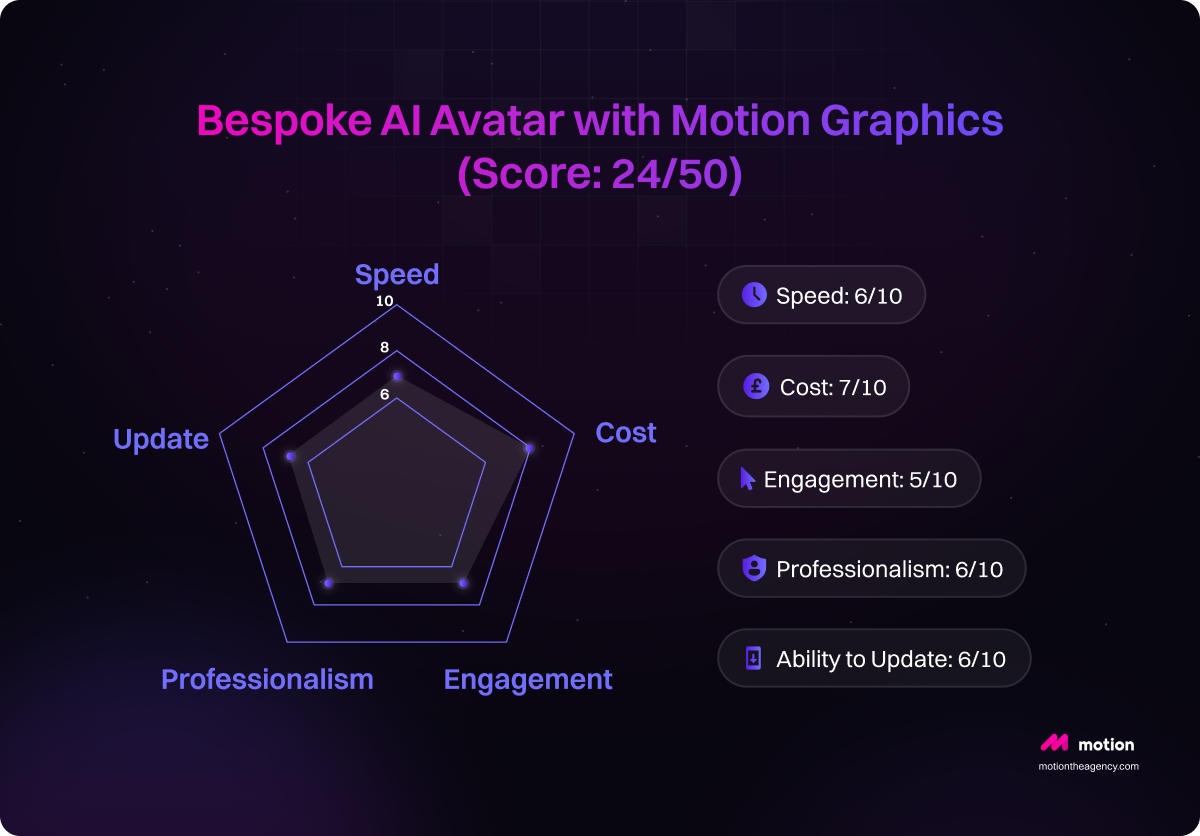
8. Bespoke AI avatar with motion graphics (score: 24/50)
Bespoke AI avatar with motion graphics product demo video enables users to create personalized digital avatars enhanced with animated visuals. This innovative tool serves various purposes, including product demonstrations, technical feature explanations, educational content, marketing campaigns, and partner training. The motion graphics overlay enhances the avatar's visual quality, ensuring brand consistency and a polished presentation.
Based on performance metrics, this feature excels in rapid creation, cost-effectiveness, high audience engagement, professional appearance, and easy content updates, making it an attractive solution for businesses and content creators seeking dynamic, visually compelling AI-driven communication tools.
9. Full production bespoke AI avatar (score: 27/50 - highest rated)
Full production bespoke AI avatar method of product demo video uses a text-to-video AI avatar combined with a stylish user interface and full animation. This approach is ideal for launching premium products, delivering important presentations, showcasing flagship products, participating in industry conferences, and running major marketing campaigns. Its main advantages are top-notch production quality, enhanced engagement, and full control over branding.
Metrics indicate that this method receives the highest ratings. In summary, the Full Production Bespoke AI Avatar technique offers an effective and visually impressive way to produce professional-quality product demonstration content for critical and high-profile occasions.

10. Basic voiceover screen recording (score: 23/50)
Basic voiceover screen recording feature product demo video is a fast, affordable way to make internal documentation, short tutorials, product updates, bug fix demos, and team communications. It's easy to use: just record your voice while capturing your screen. It's great for speed and cost, perfect for urgent or budget-limited projects. However, it may lack polish and flexibility compared to professional videos, resulting in lower scores for engagement, professionalism, and ease of updating.
Despite this, it's still a valuable tool for quick, efficient internal or targeted communications.

11. Enhanced voiceover with graphics (score: 23/50)
Enhanced voiceover with graphics product demo video offers a visually appealing way to share product information. This method is well-suited for feature explanations, product updates, user guides, technical documentation, and training materials. Using a self-recorded voiceover and motion graphics improves visual appeal and information flow, making it ideal for educational and support materials. However, lower scores in customization and scalability suggest it's better suited for internal use or smaller projects compared to AI avatar options.

12. Animated voiceover production (score: 24/50)
Animated voiceover product demo video production offers a blend of self-recorded voiceover narration and professionally designed animation with a stylized user interface.
This approach is ideal for showcasing product concepts, offering feature previews, creating engaging marketing materials, delivering compelling sales presentations, and generating dynamic social media content. While offering professional animation and engaging visuals with custom design elements, it scores moderately across various metrics.
This method is fast and can be easily updated, but it is more expensive and less engaging. It is also very professional, which leads to an overall good score. However, it may take more time and effort to make changes compared to other options, as it has lower scores for speed and ability to update.

13. Professional voiceover basic (score: 26/50)
Professional voiceover basic product demo video option offers a professional voiceover with screen recordings, making it suitable for various content needs like corporate training, product documentation, customer onboarding, help center content, and educational videos. The audio quality is professional, the communication is clear, and the overall presentation has a credible feel.
However, this approach has some limitations. It is not the fastest and can be quite difficult to update later on. While the cost is relatively low, the engagement and overall professionalism are just average.
In summary, Professional Voiceover Basic provides a solid, professional-looking result, but it lacks flexibility and may not be the most engaging option. It's a reliable choice for common content needs, but comes with trade-offs to consider.

14. Professional voiceover with graphics (score: 25/50)
The professional voiceover with graphics product demo video option uses a professional voiceover along with screen recordings and motion graphics. It works well for product launches, marketing, sales pitches, investor presentations, and conferences.
The main benefits are the high-quality production value, professional presentation style, and engaging visuals. While not the fastest or most flexible, this approach delivers a polished, impactful result that can really elevate important business content.

15. Premium professional production (score: 26/50)
Premium professional product demo video production uses a professional voiceover, stylish graphics, and high-quality animation. It's perfect for major product launches and high-profile presentations. It's very engaging and professional, but also expensive and slow to produce. While it offers the highest engagement and professionalism, it's also costly and time-consuming. The result is a top-tier presentation, ideal for making a big impact.
![Product demo video production method: Premium Professional Production scored [X]/50 — Speed 5/10, Cost 5/10, Engagement 8/10, Professionalism 8/10, Updateability 5/10](https://cdn.prod.website-files.com/66ed62501e0857dc6b74cf9f/6823410ee843f07047aba6ca_67fcda800689fedc648af95c_677651334ebc1cb3d9dab84d_67764e66ba5136ac555d7e1a_Basic%25252520Screen%25252520and%25252520Face%25252520Recording%2525252015.png)
How Motion The Agency handles product demo video production
Creating impactful product demo videos with Motion The Agency is a structured and collaborative process designed to meet your brand’s unique needs and goals. Here’s a breakdown of our approach:
Our production process
Initial consultation
We begin by gaining a thorough understanding of your product, target audience, and project objectives. This phase involves defining clear goals and selecting the best video format for maximum impact.
Our free sample service
As a specialist product demo video agency for B2B and SaaS brands, we produce everything from quick-turnaround screen recording + motion graphics packages through to full custom animation, depending on what the brief calls for. Our product demo video service is available both as a one-off project and as part of our ongoing subscription, which gives you dedicated creative capacity across your full video output. If you're evaluating agencies, we offer a free sample so you can see the quality of our work before committing to anything. No brief required, just a starting point.
Development phases
Pre-production
This phase focuses on planning and preparation. We develop a clear script, create a detailed storyboard, select an appropriate style, and set a timeline. Each element is tailored to your brand and audience, ensuring the demo effectively communicates the product’s value.

.webp)
Production
During production, we bring your storyboard to life. Our team handles asset creation, voiceover, animation, and visual effects. Whether 2D or 3D, every visual and auditory element is crafted to engage and inform your audience. Explore our latest projects here: Motion The Agency.
Post-production
In post-production, we refine the video with editing, sound design, and quality assurance to ensure a polished, professional end product that meets our high standards for clarity and visual appeal. After the video is approved we will send the handover files including all the working files.
Project management
Our project management approach ensures a smooth process with milestone tracking, regular client communication, and a structured revision process to incorporate your feedback seamlessly. The result is a video that aligns with your brand vision and goals.

Delivery and support
Upon completion, we deliver the video in optimized formats for the platforms you’ll use. We provide handover files including all the working files that can support future updates as your product or messaging evolves, ensuring your demo video remains relevant and effective.
By following these steps, Motion The Agency’s expert team creates product demo videos that not only showcase your product’s features but also resonate with your audience and drive results.
Making your product demo video production more effective
Creating an engaging product demo requires more than just showcasing features; it demands a strategic approach to storytelling, engagement, and quality control. Here are key elements to ensure your demo captures and holds your audience’s attention effectively.
Storytelling techniques
Craft a narrative that highlights the product’s unique value by framing the demo around a relatable customer problem. Lead with the challenge, introduce your product as the solution, and emphasize the transformation it brings. This storytelling approach not only captures attention but also makes the product’s benefits more memorable.
Engagement tips
To maintain viewer interest, keep visuals dynamic and incorporate elements like on-screen text and animations to highlight essential features. Use a clear, conversational voiceover that speaks directly to the target audience. Breaking the content into digestible sections can also improve viewer retention.
Common mistakes to avoid
Avoid overloading the video with excessive technical details that could detract from the core message. Focus on the product’s key benefits, and keep the script concise. Another common pitfall is underestimating the importance of quality audio and visuals; investing in these elements can significantly enhance the video’s professionalism and appeal.
Quality assurance checklist
Before finalizing the video, conduct a thorough quality check. Review audio clarity, check for brand alignment in visual elements, and ensure the video meets platform specifications. Testing on multiple devices also helps guarantee a consistent viewing experience across channels.
Key takeaways
The 15 product demo video methods presented offer a spectrum of options, balancing production quality with practicality and budget. Key takeaways include:
- Speed and Cost: Methods using AI avatars generally offer faster turnaround times and lower costs, ideal for frequent updates or budget-conscious businesses. While other methods, potentially higher quality, require more time and resources.
- Engagement and Professionalism: Methods incorporating professional voiceovers, animation, and stylized UIs generally achieve higher engagement and professionalism, but at a higher cost. Simpler methods like basic screen recordings are quicker but may lack polish.
- Scalability and Updatability: AI-driven methods often excel in scalability and ease of updating, making them suitable for frequent content revisions. Simpler methods can be more challenging to update.
- Achievability vs. Perfection: Start with a method that aligns with your resources and goals. Don't strive for perfection initially; focus on creating a functional demo and iterating based on feedback.
Method recommendations by business type
- Startups & Small Businesses: Basic screen and face recording, enhanced screen recording, or AI avatar with screen recording are cost-effective options for quick demos and frequent updates. Prioritize speed and cost-effectiveness over high production value.
- Growing Companies: Enhanced screen recording, stylized UI recreation, or AI avatar with motion graphics offer a balance between quality and efficiency. These methods allow for more polished presentations while maintaining reasonable production costs.
- Enterprise & Established Brands: Premium AI avatar videos with full animation or professional voiceover with graphics/animation are suitable for high-stakes presentations and major product launches. Prioritize high production value and brand consistency.
Final reminder
Don't let the pursuit of perfection paralyze you. Start with a simple, achievable method and iterate based on results and feedback. Continuous improvement is key; regularly review your demo videos and adapt your strategy as needed.
Ready to elevate your product demos? Choose the method that best suits your business needs and budget. Explore the resources and tools mentioned in the guide to streamline your video production process. For custom solutions and expert assistance, contact Motion The Agency to discuss your project requirements and request a free sample now.
FAQ

Sam Jupp
Sam Jupp is the founder of Motion The Agency, with over 11 years of experience in research and marketing. He specializes in leveraging creative animation and motion design to craft compelling brand narratives and writes insightful content on industry trends.

In just a few questions, get a tailored estimate for your next video project.




Contact Us
Ready to elevate your brand? Contact us for your
Free Custom Video Sample