AI-Assisted Video Production: What Still Needs Human Direction (2026)
table of content
Every agency says they use AI, but how?
Every agency talks about using AI, but few explain what that actually means. At Motion, we believe AI is a powerful tool for video creation — but it is still just a tool. It can help accelerate certain parts of production, but it does not replace the creative thinking, storytelling, and direction behind a great video.
We are not an AI motion graphics company. We are a creative studio that creates and animates projects using the same principles that have always guided great production: strong ideas, clear storytelling, thoughtful design, and intentional creative decisions.
AI is simply another tool in our workflow. We use it to explore ideas faster, create certain visual assets more efficiently, and add flexibility throughout production. But the creative direction behind every project — from the initial concept and script to the storyboard, art direction, animation, and final edit — remains human-led.
The biggest misconception is that AI video starts with a prompt and ends with a finished video. In reality, a strong AI-assisted workflow still follows many of the same principles as traditional filmmaking.
A traditional filmmaking workflow typically follows:
Scriptwriting → Shot planning → Camera decisions → Production → Editing → Sound design
An AI-assisted workflow follows a similar structure:
Scriptwriting → Shot planning → AI-generated assets → AI-generated footage → Editing → Motion graphics → Sound design
The process is still built around storytelling, planning, and creative direction. AI changes how certain production stages are executed, but it does not replace the people behind the work. The goal is not to use AI instead of creativity — it is to use AI to enhance the creative process and produce better results.
What we mean by AI-assisted video production (and where the human stays)
We have stressed that Motion is not an AI motion graphics company, and that distinction is important. We are a creative studio that believes great video still comes from human creativity, storytelling, and craft.
To be completely honest, we believe AI will not replace animators, designers, or video editors. The creative decisions that make a video effective, from understanding the audience to shaping the story, directing visuals, refining details, and knowing what works, still require human experience and judgment.
At the same time, we can see the value AI brings to the industry. When used correctly, AI is a powerful tool that helps us make parts of the creative process faster, more flexible, and more efficient.
We use AI to support areas such as:
- Backgrounds — creating environments and visual elements faster during production.
- B-roll — generating supporting footage and visual assets that enhance storytelling.
- Concept visuals — exploring ideas and visual directions before production begins.
- Early exploration — testing creative possibilities and developing concepts more efficiently.
AI helps us explore more ideas and move faster, but it does not replace the creative process. The storytelling, art direction, animation, editing, and final decisions remain in the hands of our creative team.
Now, you might be wondering: if AI can handle so many parts of the production process, what do we still need animators and video editors for?
The short answer is that AI creates the raw material, but humans decide the story, direction, and final execution. In our workflow, our team handles everything before production begins, from ideation and storytelling to scripting, storyboarding, and creative direction.
The same applies during production. Our animators and editors are still responsible for bringing ideas to life through animation, editing, motion design, sound design, and final quality control. AI helps us move faster, but the creative decisions that turn individual assets into a meaningful story still come from our team.
Why human planning cuts AI waste
Now, this is where we want to show why simply generating an image or video with AI is not enough. The tool itself is only one part of the process. Creating a high-quality video still requires planning, creative direction, storytelling, and human decision-making throughout production.
To show what this looks like in practice, we will use our recent ClickUp project as an example of an AI-assisted, human-led workflow. The project demonstrates how AI can accelerate production while the creative decisions, from concept development and shot planning to editing and final execution, remain guided by our team.
Before looking at our workflow, it is important to understand the alternative: a pure AI text-to-video approach. While these tools can generate impressive results from a simple prompt, they often lack the creative direction and consistency needed to produce a complete, polished video.
A prompt can create a clip, but it does not understand the bigger story, the purpose of the shot, how each scene connects, or how the final video should communicate with an audience. This is where human-led creative direction becomes essential.
Pure text-to-video workflow:
A pure AI text-to-video workflow often starts with a simple prompt and relies on the model to figure out the visual direction:
Prompt → Generate → Something is wrong → Regenerate → Repeat
While this approach can create impressive individual clips, it often lacks the structure needed for a complete video. Without clear visual planning before generation, the process becomes more unpredictable and can lead to unnecessary iterations.
The main challenges are:
- No visual constraints — AI has to interpret the entire scene, style, composition, and storytelling direction from a single prompt.
- More randomness — Each generation can produce different results, making it harder to maintain consistency across multiple shots.
- More wasted generations — Without a clear creative direction, teams may spend more time regenerating clips instead of refining the final video.
AI can generate a moment, but creating a cohesive video requires more than individual clips. It requires planning, consistency, and human creative direction.
The advantage of a human-directed AI video production
A human-directed workflow starts before we ever open an AI tool. Instead of giving AI a simple prompt and hoping it understands the full vision, we first define the idea, story, and purpose behind each shot.
Concept → Storyboard → Defined shots → Generate → Refine
By doing the creative planning upfront, AI becomes much easier to guide. The model is not making every decision from scratch because it already has a clear direction to follow.
The benefits are simple:
- AI has less room to misunderstand — clear references and shot planning help keep the output closer to the original vision.
- Fewer generations are wasted — instead of constantly retrying random outputs, each generation has a clear purpose.
- More budget goes toward improving the final video — less time and resources are spent fixing avoidable mistakes.
The biggest difference is not the AI tool itself, but the process behind it. Good planning helps AI work better, while keeping the creative decisions in human hands.
The difference is iteration, quality, and budget
Now, you might be wondering what really separates these two workflows. The answer comes down to three key factors: iteration, quality, and budget.
Before we break down each of these points, we want to show you the video that will be the focus of this article. This ClickUp project is a real example of how an AI-assisted, human-led workflow works in practice, from planning and generation to refinement and final production.
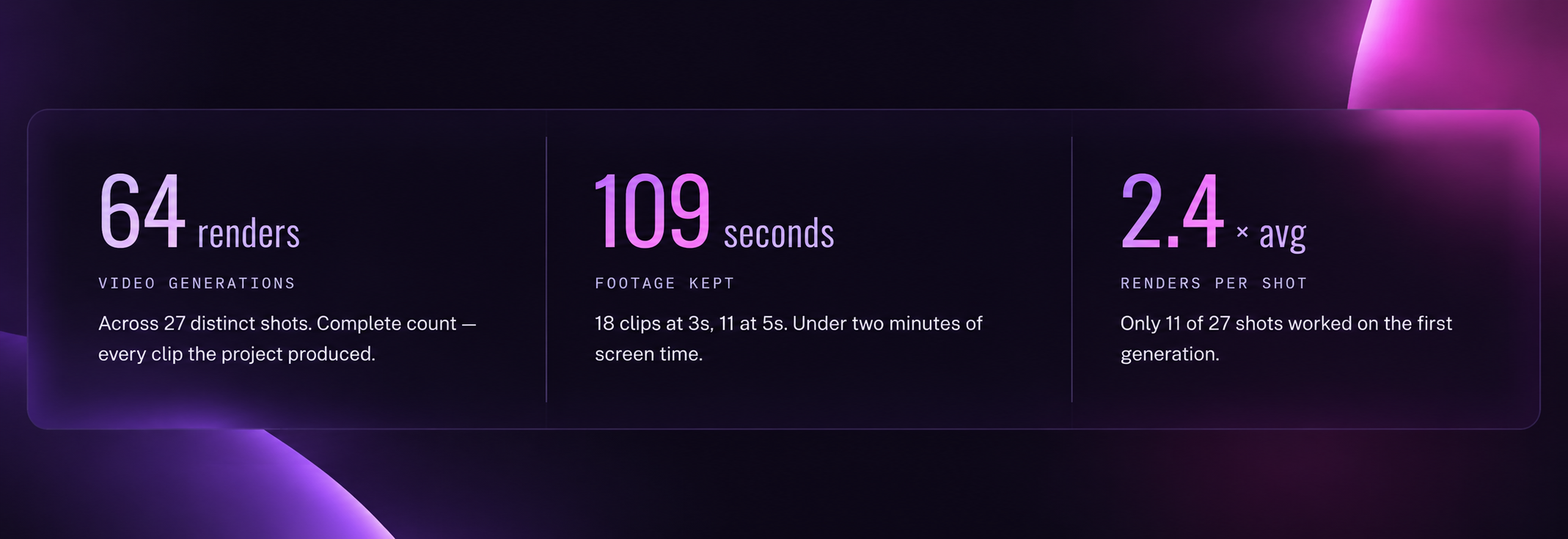
The best way to understand this workflow is to look at the process behind the final result. Here are the real numbers from the ClickUp project:
Iteration
Without clear planning and storyboarding, AI-generated video can easily feel inconsistent, disconnected, or even unnatural. Planning helps us reduce unnecessary retries by giving each shot a clear direction before generation begins.
For this project, only 11 out of 27 clips worked on the first generation. The remaining shots required additional refinement, whether through adjusting prompts, changing approaches, or going back to the drawing board to better match the original creative direction.
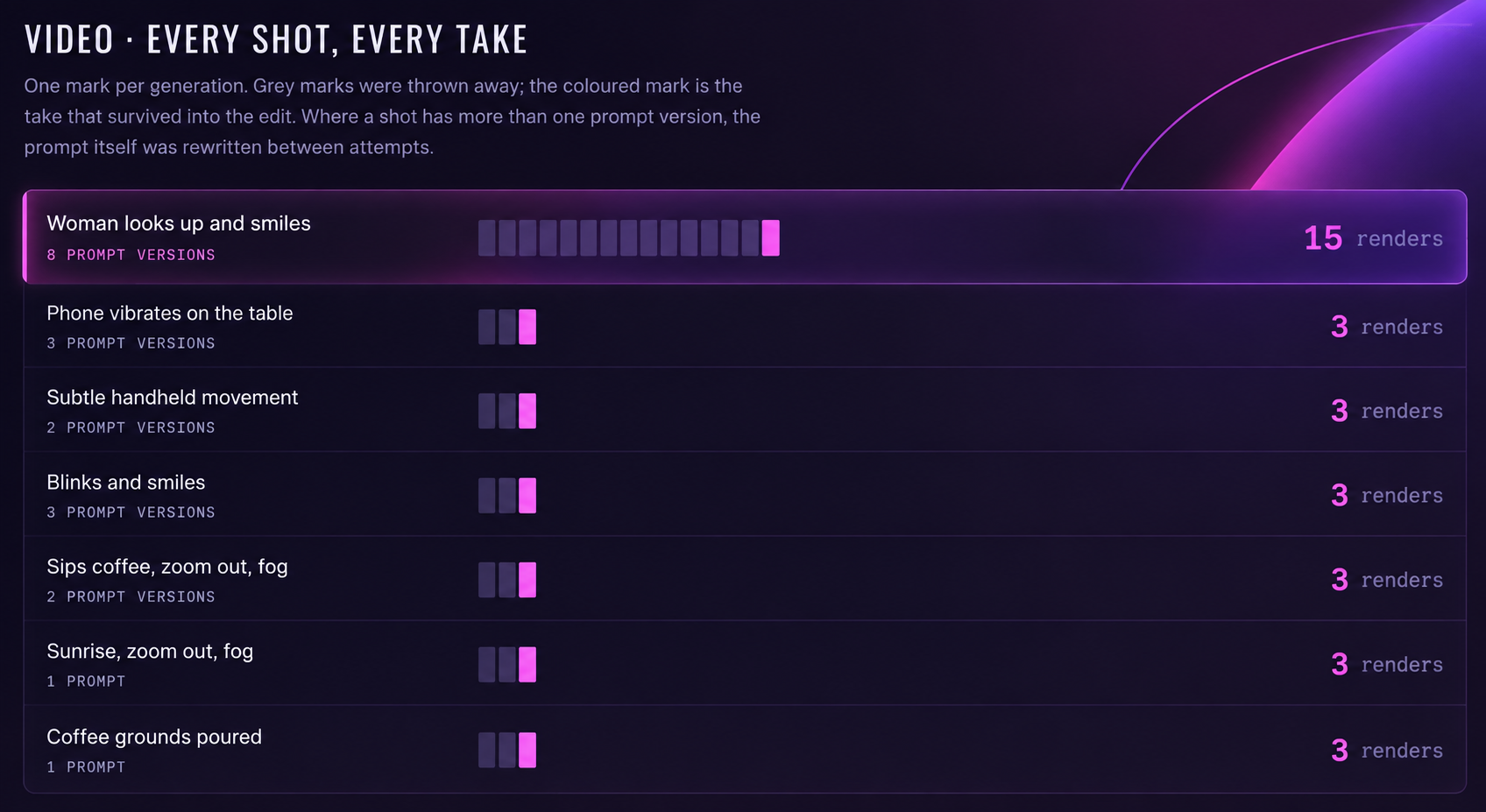
Even with thorough planning, some shots are still significantly harder to generate than others. Human elements, especially when a specific emotion or expression is required, remain one of the biggest challenges for AI. A shot like a character looking, reacting, or showing a certain feeling requires much more refinement because small details in facial expression and body language can completely change how the audience perceives the moment.
To keep the process controlled, we maintain a detailed record of every prompt, iteration, and creative adjustment made throughout production. This allows us to understand what worked, what did not, and how each decision contributed to the final result.
This is the reality of AI-assisted production. The first generation is rarely the final result. The quality comes from the process of testing, refining, and making the right creative decisions along the way.
Budget
One of the biggest advantages of a human-directed AI workflow is that better planning helps control production costs. AI generation can become expensive when teams rely on trial and error, repeatedly generating clips without a clear creative direction.
By defining the concept, storyboard, and shot requirements upfront, we can reduce unnecessary generations and spend more resources on refining the final output rather than fixing avoidable mistakes.
For this ClickUp project, the total AI generation cost was:
- £15 with Magnific’s unlimited generation subscription
- £47 without unlimited generation
The difference is not just the cost of the AI tools themselves, but how efficiently they are used. A clear creative process helps us get more value from each generation and avoid wasting budget on outputs that do not move the project forward.
Quality
AI can generate impressive visuals, but the output still requires human judgment to decide what works and what does not. A generated clip might look technically correct, but it does not always capture the right emotion, timing, or creative intention needed for the final video.
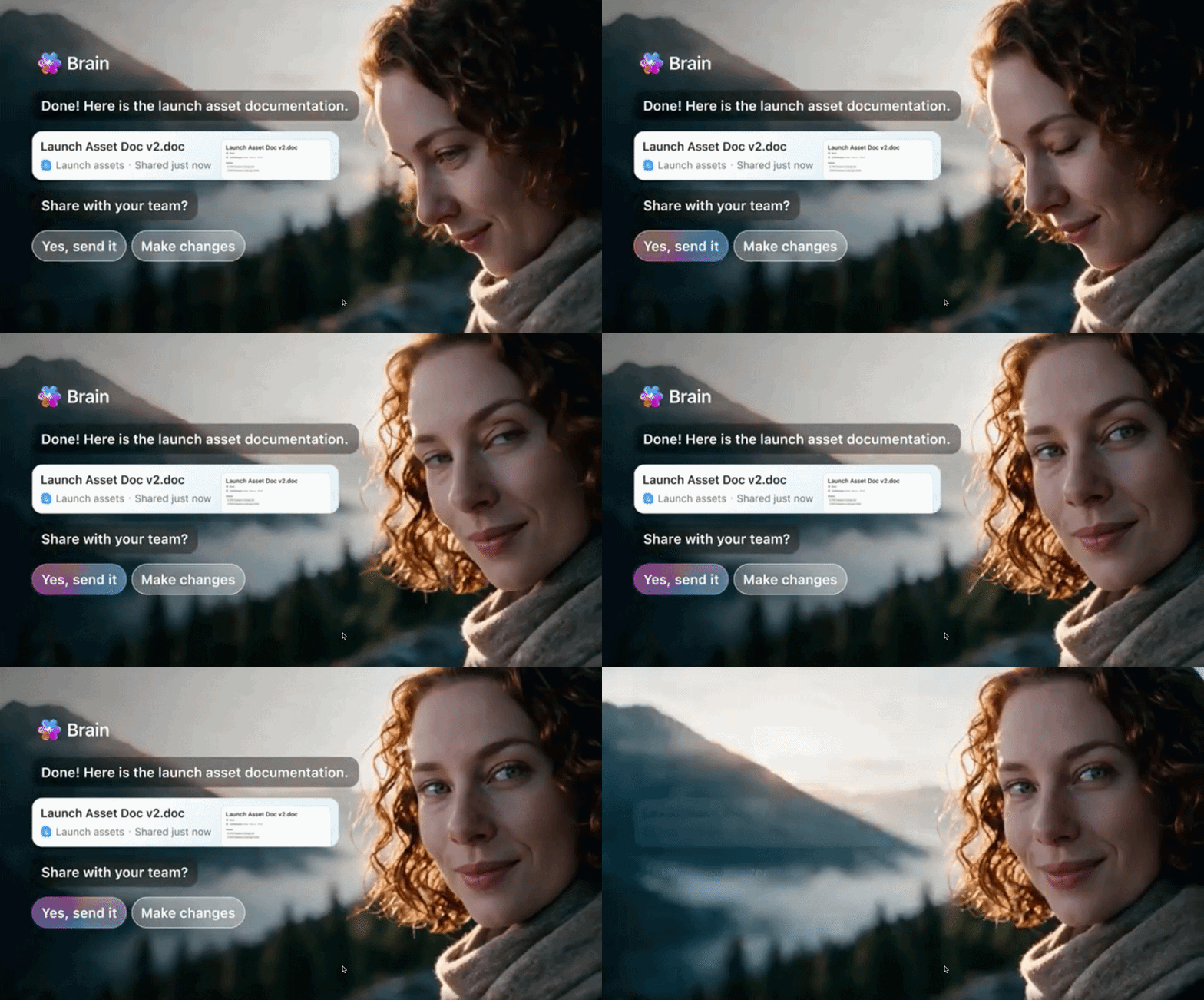
For this project, even a single shot required significant refinement. The “woman looks up and smiles” scene needed:
- 15 renders to achieve the right result
- 8 prompt rewrites to adjust the direction
- Multiple AI model tests to find the best approach
This is where human creative judgment becomes essential. The role of our team is not just generating more options, but knowing which details matter, identifying what feels right, and refining the output until it supports the story we want to tell.
AI can create the building blocks, but human experience is what turns those individual generations into a finished piece.
The AI-assisted video production workflow: From concept to final video
A common misconception is that AI video starts with a prompt and ends with a finished video. In reality, a strong AI-assisted workflow still follows many of the same principles as traditional filmmaking. AI is introduced as a production tool within the process, helping teams move faster while keeping the creative decisions human-led.
The workflow still starts with planning, not generation.
1. Planning stage
.png)
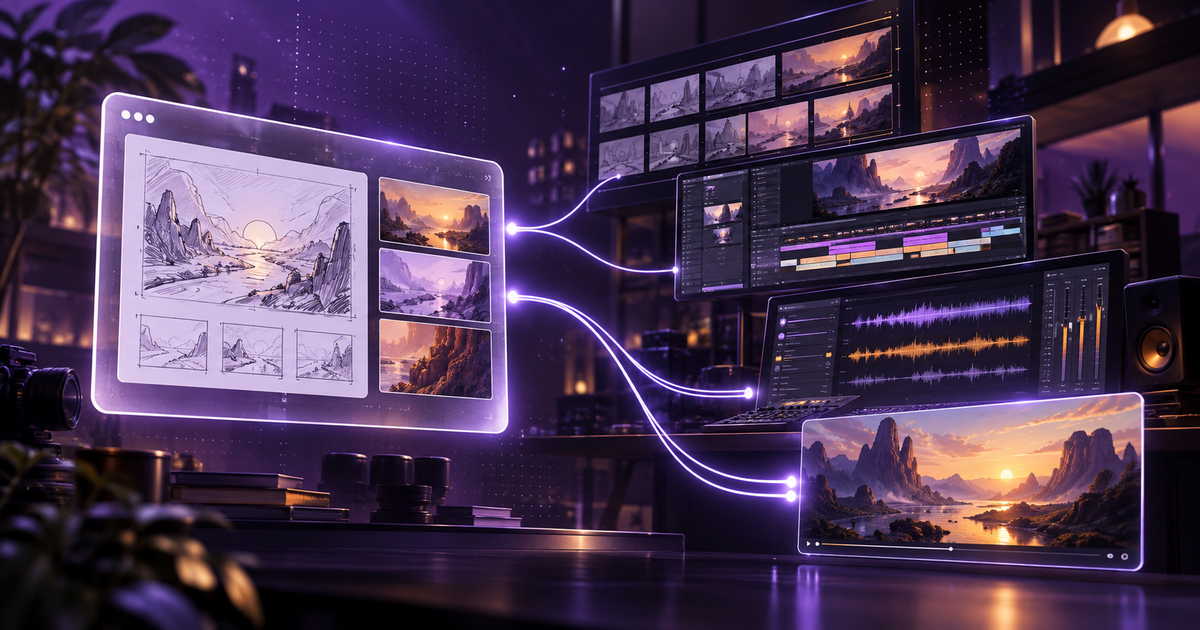
Before generating anything, we start with the creative foundation: scriptwriting, shot list development, and defining the overall visual direction.
Just like traditional filmmaking, every shot needs a purpose. We need to understand what the audience should see, how the story should progress, and what each scene needs to communicate before AI starts creating visuals.
For this project, we planned and documented every shot before generation began. Each scene had a clear direction, including the visual intent, composition, camera perspective, lighting, mood, and other details needed to guide the output. We also documented every prompt used throughout the process, allowing us to track iterations, understand what worked, and refine each shot with more control.
The goal is simple: create a clear blueprint before generation begins.
A planned workflow looks like:
Concept → Storyboard → Defined shots → Generate → Refine
Compared to a pure text-to-video approach:
Prompt → Generate → Something is wrong → Regenerate → Repeat
The difference is that AI is not making every creative decision from scratch. By defining the direction upfront and using prompts built around clear filmmaking principles, AI has less room to misunderstand the intent, fewer generations are wasted, and more effort can go into refining the final result.
Instead of asking AI to decide what a shot should look like, we give it a clear creative direction and use it as a tool to help bring that vision to life.
2. Asset consistency and generation
.png)
Once the visual assets and starting images are ready, they become the foundation for animation. Instead of generating an entire video from a single prompt, we break the process down into smaller, more controlled steps.
The workflow follows:
Defined shot → Generated image → Animated footage → Edited sequence
Each stage gives us more control over the final result. We first define exactly what each shot needs to communicate, then create the starting image based on that direction. Once we have a visual that matches the creative intent, AI is used to bring that image to life through movement and animation.
This approach allows us to focus on the parts where AI performs best, such as generating motion, camera movement, and visual variations, while keeping the creative decisions in our hands. Instead of asking AI to decide the entire scene, we guide it with a clear starting point and refine the output until it fits the story.
This also helps maintain consistency throughout the video. When every shot starts from a planned visual foundation, it becomes easier to control characters, environments, style, and overall pacing across the entire sequence.
The result is a workflow that combines the flexibility and speed of AI generation with the creative control of traditional production. AI helps us create and iterate faster, while our team ensures every shot feels intentional and connected to the bigger story.
3. Image-to-video generation
.png)
Once the visual assets and starting images are ready, they become the foundation for animation. Instead of generating an entire video from a single prompt, we break the process down into smaller, more controlled steps.
The workflow follows:
Defined shot → Generated image → Animated footage → Edited sequence
Each stage gives us more control over the final result. We first define exactly what each shot needs to communicate, then create the starting image based on that direction. Once we have a visual that matches the creative intent, AI is used to bring that image to life through movement and animation.
This approach allows us to focus on the parts where AI performs best, such as generating motion, camera movement, and visual variations, while keeping the creative decisions in our hands. Instead of asking AI to decide the entire scene, we guide it with a clear starting point and refine the output until it fits the story.
This also helps maintain consistency throughout the video. When every shot starts from a planned visual foundation, it becomes easier to control characters, environments, style, and overall pacing across the entire sequence.
The result is a workflow that combines the flexibility and speed of AI generation with the creative control of traditional production. AI helps us create and iterate faster, while our team ensures every shot feels intentional and connected to the bigger story.
4. Editing and animating
.png)
AI-generated footage is only the starting point, not the finished video. Once we have the visuals and footage generated, our team continues the process by refining, improving, and building on top of those elements.
This is where the human creative process really comes in. We create additional motion graphics assets, combine different layers through compositing, and add design elements to make sure everything feels consistent with the original creative direction. Instead of simply using the AI output as it is, we treat it like any other production asset that needs to be shaped and refined.
This approach is something we have already applied in projects like our work with Hyperexponential, where AI-generated footage was refined through traditional post-production techniques to create a more polished and human feel. The focus was not just generating visuals, but editing and shaping the footage so it felt intentional, consistent, and aligned with the brand.
We also apply traditional post-production techniques like colour grading, visual effects, and film imperfections to add more depth and make the final result feel more polished and intentional. These details help the footage feel less like separate AI-generated clips and more like a complete piece of content.
The goal is not to let AI create the entire video by itself. It is about combining AI-generated elements with human creativity, design, and production expertise to create something that feels thoughtfully made.
5. Sound design
.png)
Now, the final layer that brings everything together is sound design. While visuals capture the audience’s attention, sound helps them feel more connected to the story and stay immersed in the experience.
Adding sound is not just about putting background music underneath a video. We carefully combine different audio elements, including sound effects, ambience, transitions, and music, to support what is happening on screen and guide the audience through the narrative.
Small details can make a big difference. For example, adding subtle sounds like birds chirping in the background during the opening moments or the sound of water being poured into a cup can instantly make a scene feel more alive. These small touches add another layer of realism and help the audience feel like they are stepping into the world of the video rather than simply watching it.
Background music also plays an important role in setting the emotion and pacing of the story, while sound effects can make animations and transitions feel more impactful. Together, these elements help transform individual AI-generated clips into a more complete and immersive experience.
These details may seem small, but they are often what separates a collection of AI-generated clips from a polished production. By combining visuals, motion, and sound, we create a video that feels intentional, engaging, and closer to a traditionally produced piece.
Sound design is a key part of every video we create. If you want to learn more about how we approach audio in animation and explainers, we cover the topic in more detail in our guide on Sound Design for Explainer Videos.
Conclusion: AI makes us faster, but creativity still leads
AI-assisted video production is changing how videos are created, but the fundamentals of great production have not changed. A strong video still starts with a clear idea, a good story, and the creative decisions that shape how people experience it.
The ClickUp project is a good example of this. AI helped us explore ideas faster, create visual assets more efficiently, and experiment with different directions. But the final result came from the same process behind every Motion project: understanding the goal, planning the story, refining the details, and making sure every shot has a purpose.
We don’t see AI as a replacement for animators, designers, or editors. We see it as another tool that helps our team work more efficiently and push creative possibilities further.
The future of AI-assisted video production is not about choosing between AI and human creativity. It is about combining both to create better work.
Want to see how this approach could work for your next project? Get a free custom video sample and experience our creative process firsthand.
FAQ

Sam Jupp
Sam Jupp is the founder of Motion The Agency, with over 11 years of experience in research and marketing. He specializes in leveraging creative animation and motion design to craft compelling brand narratives and writes insightful content on industry trends.


In just a few questions, get a tailored estimate for your next video project.




Contact Us
Ready to elevate your brand? Contact us for your
Free Custom Video Sample