Explainer video for b2b & saas
Explainer videos for products that are hard to explain

Trusted by industry leaders

Our selected
explainer video projects

A proven explainer video partner
for complex products
512
53%
187


A buyer-first approach
to your explainers

Everything included
in your explainer video
Free sample
Script
Storyboard
Storyboard revision
Animation
Video revision
Delivery

Choosing the right
explainer video company

Flexible ways to work with us
You have a defined brief
One off or occasional need
Want upfront cost clarity
- You need output every month
- Want a dedicated team
- Predictable monthly budget
- Campaign bursts, not every month
- Want a team on standby
- Large budget, flexible timing
Got questions?
We've got answers
We want to make sure you feel confident that our service is right for you. Here we’ve looked to address some commonly asked questions. If you have any more specific questions, don’t hesitate to get in touch with a member of the team.

What is an explainer video?
An explainer video is a short animated video, usually 30 to 90 seconds, that makes a product, process or idea easy to understand. It replaces a long page of text with something people actually watch to the end.
Ours are built on 2D animation, and we add 3D and motion graphics where they help. Most follow four beats. The problem comes in the first 15 seconds, then the solution, then how it works, then one next step.
Software companies buy more explainers than anyone else, because you can't photograph a workflow or film a product that lives behind a login.
What makes an explainer video different?
An explainer video makes people understand what you do and why it matters. Other videos assume they already do, since a demo shows the product to someone who already cares, an ad pushes one message and a sizzle reel shows your range. It's also the most reusable video you'll commission. Because it's animated, one video can be cut down for your homepage, social feed, paid ads and sales deck without a reshoot, and edited when the product changes.
It won't close a deal on its own. It gets someone to understand you well enough to book a call, and your sales team does the rest.
What types of explainer video are there?
The main types of explainer video are 2D with 3D, character-led animation, motion graphics with 3D, screencast, whiteboard animation and infographic. For software products, 2D with 3D is the standard choice because it shows the interface moving.
Each style suits a different goal. Character-led animation works for stories more than screens. Motion graphics with 3D fits abstract or technical ideas with no product to show. Screencasts suit straight software walkthroughs, whiteboard animation teaches a process step by step, and infographic style handles data and comparisons.
Pick by goal first, then match the style to your brand, tone and audience. We agree on that with you before anyone starts drawing.
How long should an explainer video be?
An explainer video should usually be 30 to 45 seconds long. That's enough time for one message to land while people are still paying attention.
Complex products are the exception. If your product is complex, or you're speaking to two audiences at once, 90 or 120 seconds often works better than forcing it into 45.
To check, write the script you want and count the words. Scripts run at about 130 to 150 words per minute, so 280 words needs a video of about two minutes, not 60 seconds.
How much does an explainer video cost, and what drives the price?
Our explainer videos start at $3,480 for a 30-second video on Basic, and we usually recommend Premium, from $4,080, because it includes the storyboard stage. The price mainly depends on length, animation technique, how much storyboard work is included, and whether voiceover and platform versions are included.
All our prices are published. If you need videos regularly, the subscription or creative credits cost less per video, and credits can go toward other formats like a product demo or a launch video.Be careful with quotes far below the rest of the market. They often leave out the storyboard stage, and that cost comes back later as revisions, when changes are most expensive.
Are you affordable for a startup?
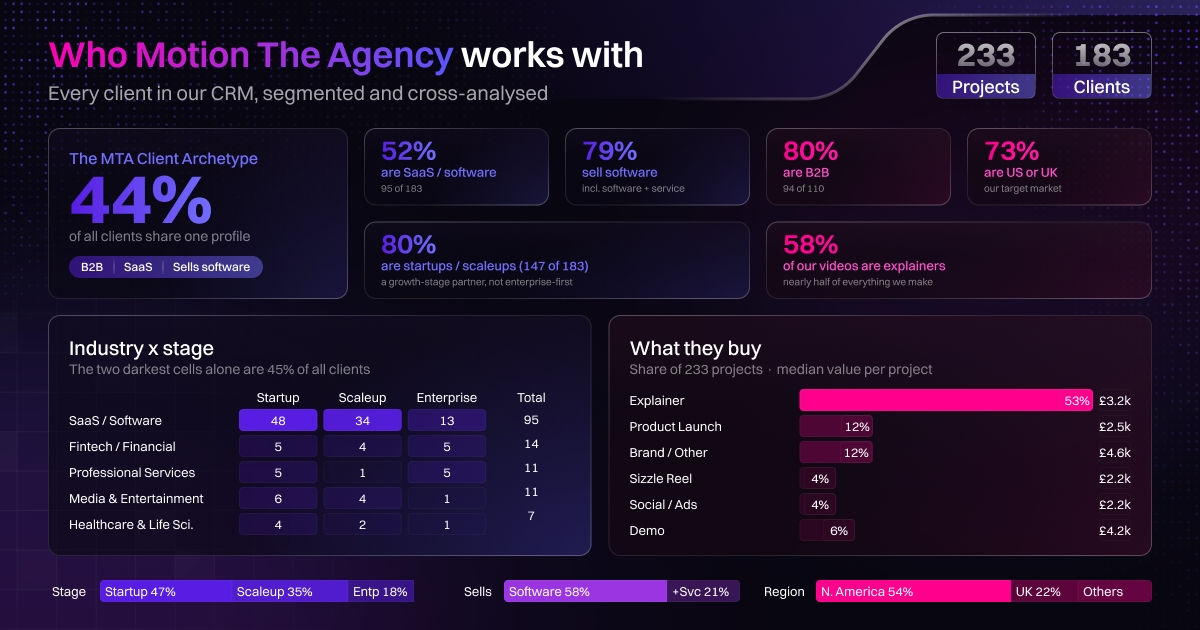
Yes. Around 80% of our clients are startups or scaleups, and our pricing is published so you can check the cost before you talk to us.
Each package lists exactly what's included, and there are three ways to buy. You also get a free sample built on your own product within 48 hours, before you pay anything.
There's no contract to sign before you start and no minimum commitment. That suits startups, though it also means we aren't set up for enterprise procurement.
How long does production take?
Most explainer videos take about a week to 10 business days of production, plus your review time. The process runs from a free sample to script, storyboard, animation, review and delivery.
You send us the concept you find hardest to explain, and within 48 hours we animate a sample. In week one, we refine the story from your ideas or script, map out every scene and lock the storyboard with your feedback. Week two is animation, with voiceover and sound design. In week three, you review the draft with timestamped feedback, we make changes, and we hand over the final video, source files and platform versions.
Nothing moves forward until you've signed off on the stage before it. A storyboard that waits four days for approval pushes delivery back by four days.
How do you write a script for an explainer video?
Write an explainer video script around one core message, using four beats, which are problem, solution, how it works and one call to action. Keep it conversational, free of jargon, and paced at about 130 to 150 words per minute.
Open the first five seconds on a real frustration, not a brand introduction, and cut anything that isn't part of the core message.
We can write the script for you from the material you give us. Many clients write it themselves with our structure and feedback, since the team building the product knows its language best. Either way, we agree on the script before animation starts. Changing a line then takes minutes, and changing it later can mean redoing a scene.
What are the best use cases for an explainer video?
The best use cases for an explainer video are complex products, new features, onboarding and launches. It's also worth making one when your support or sales team keeps explaining the same thing on every call.
A complex product is hard to explain in a page of text, and a new feature is easier to show than describe. Onboarding videos help users see the value before they drop off. At launches and events, you get one chance to be understood by people who won't read anything.
If your prospects already understand what you do and want to see the product working, you need a product demo instead.
Where should you use an explainer video?
Use an explainer video on your homepage and product pages first, because that's where people go to find out what you do. Then reuse it on social media, in paid ads, inside your product for onboarding, on YouTube and on event screens.
All of these versions come from one master file. A short vertical cut goes on social, several short cuts go into ads, a trimmed version sits in onboarding, and the full video goes on YouTube, where it also helps search.
Tell us where the video will be used before we start. A social feed usually plays with the sound off, so that version needs on-screen text that a homepage version doesn't.
Can you explain a complex AI product in an explainer video?
Yes. We explain complex AI products by showing the problem they solve, and where there is a product to show, we build a simplified, stylized version of it.
AI products are hard to show directly because the work happens across huge amounts of data, so there's often nothing useful to film or screen-record. Several of our AI clients chose not to show the product at all, because the idea is what they're selling. The trade-off is that viewers who want proof it works will still need a demo.
As Sam, our founder, puts it on client calls, we create a stylized version of your product so there are no distractions, and anything that isn't relevant to the point isn't shown.
What does a good explainer video look like?
A good explainer video is short, opens on the viewer's problem and carries one clear message. It usually runs 60 to 90 seconds and ends with a single call to action.
The script is conversational and free of jargon, moving through problem, solution, proof and call to action. The animation stays in sync with the voiceover, so when the audio says "save time," something on screen speeds up. The audio has three layers, a professional voiceover, music underneath, and subtle sound effects.
Style matters much less. A 2D and 3D build, character animation, motion graphics, a screencast, whiteboard or infographic can all work.


.avif)